SMS Messaging Opt-In & Consent
This page documents exactly how MedsYet.com collects consent before sending any text messages, so anyone — including carriers and reviewers — can verify our opt-in process without creating an account.
About the MedsYet.com messaging program
MedsYet.com sends automated, transactional medication and health reminders (not marketing) to patients and their caregivers in the United States. A caregiver (or the patient themselves) sets up a reminder schedule from their account, and MedsYet.com then sends text messages such as a heads-up before a dose, the reminder itself, and a simple “Reply YES or NO” confirmation question. If a reminder goes unanswered, we may send a follow-up text, place an automated voice call, and alert the family contacts on the account.
How consent is collected (step by step)
Consent is collected in two places: an explicit checkbox when the account is created, and a one-time opt-in text that the recipient must reply YES to before any recurring reminders begin. Here is the complete experience:
Create an account and give explicit consent
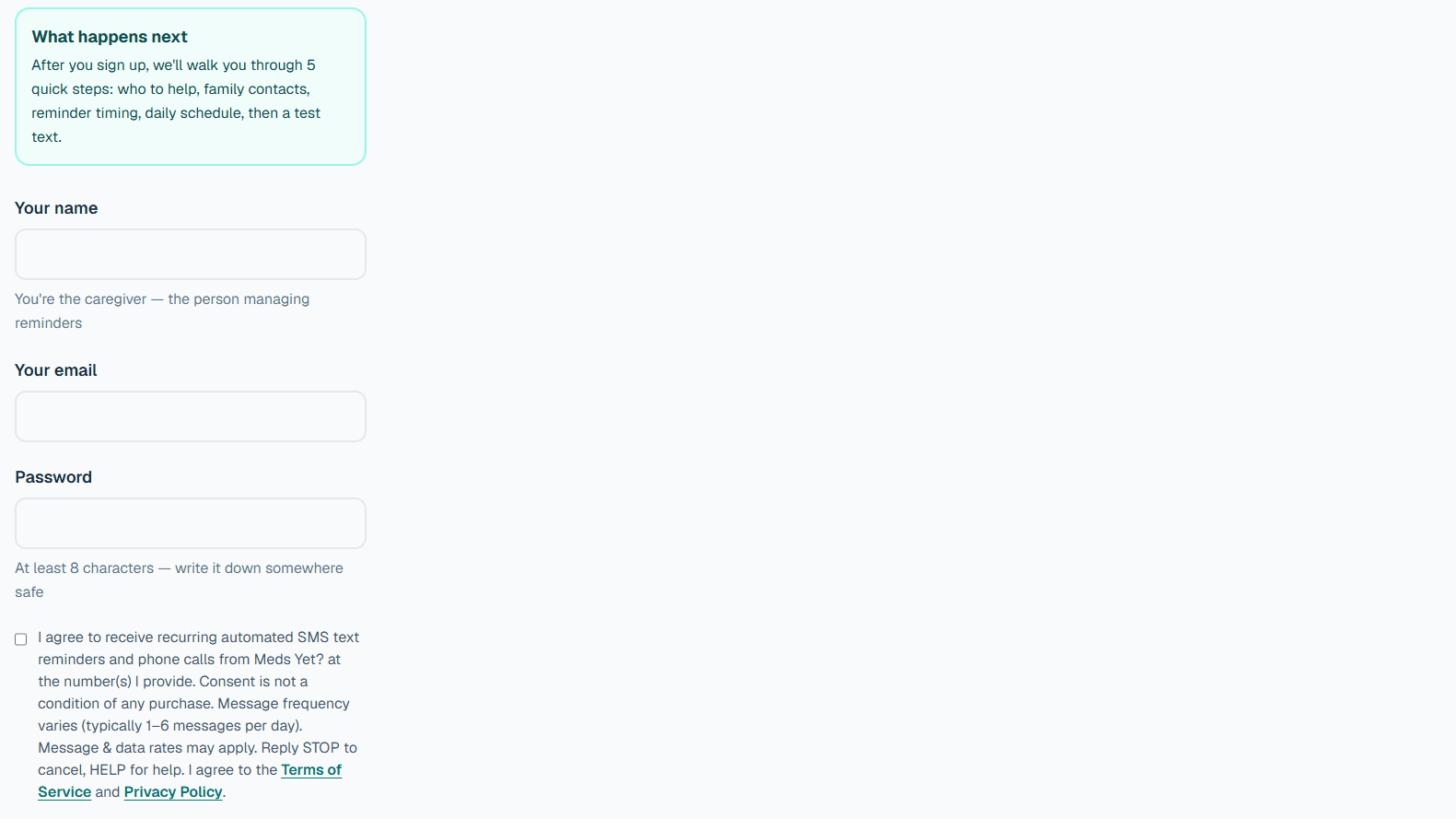
A caregiver or patient signs up at medsyet.com/signup. Before they can create the account, they must actively check a consent box that is unchecked by default. The exact checkbox label reads:
The box above is shown unchecked, exactly as it appears on the live signup form. The account cannot be created until the user checks it.
Enter the recipient's mobile number during setup
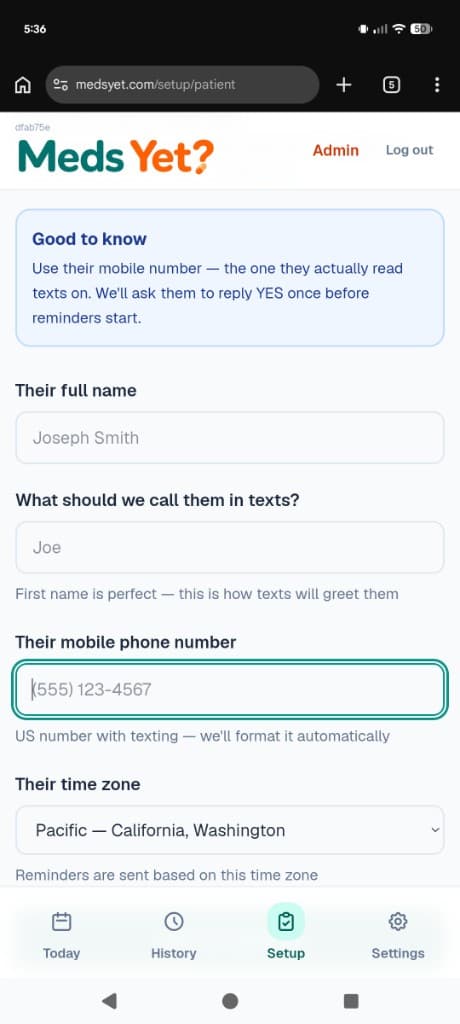
During account setup, the account holder enters the recipient's mobile phone number on this screen. This is where the number that will receive texts is provided.
Setup · Who are we reminding?
Their full name
Their mobile number (US number that can receive texts)
The account holder enters the recipient's mobile number here during setup. No reminders are sent to this number until the recipient opts in via the text in Step 3.
The recipient confirms by replying YES to a one-time opt-in text
MedsYet.com sends a single opt-in text to that mobile number. This is the exact one-time opt-in text we send to the recipient's phone:
The recipient replies:
Recurring reminders begin only after the recipient replies YES. If the recipient never replies YES, no further reminders are sent.
Stop or get help at any time
The recipient can cancel at any time by replying STOP (or CANCEL, END, QUIT, UNSUBSCRIBE), and can reply HELP (or INFO) for help. After replying STOP, they receive one final confirmation and no further messages.
Backup / emergency contacts
When setting up reminders, an account holder may also add a few backup contacts(for example a spouse, sibling, or neighbor) who can be alerted if the patient doesn't confirm an important medication. Backup contacts give their own consent — they are never added to a marketing list, and their numbers are never shared.
Each backup contact receives a one-time opt-in invite
When a backup contact is added, MedsYet.com sends them a single opt-in invite that names the patient and explains exactly what they'll receive:
The backup contact replies:
Alerts are sent only after the contact opts in
A backup contact receives alert texts only after they reply YES from their own phone. If they never reply YES, they receive no further messages beyond the one-time invite. They can reply STOP at any time to opt out, or HELP for help.
Re-adding a contact who previously opted out
If a backup contact previously replied STOP and is later re-added, they are not permanently blocked in our app — we send a fresh opt-in invite. However, because STOP is enforced by the mobile carrier, that contact must text START to our MedsYet.com number themselves before any texts can reach them again. We never override a STOP.
Messaging terms & disclosures
- Program:MedsYet.com automated medication & health reminders (transactional, not marketing).
- Message frequency varies based on the reminder schedule — typically 1–6 messages per day.
- Message & data rates may apply.
- Reply STOP to cancel at any time. Reply HELP for help, or visit our contact page.
- See our Privacy Policy and Terms of Service. Mobile phone numbers and opt-in data are never shared with third parties or affiliates for marketing or promotional purposes.
Sample messages
Examples of the automated, transactional messages a recipient may receive:
Questions about how your information is handled? Read our Privacy Policy and Terms of Service, or contact us.